
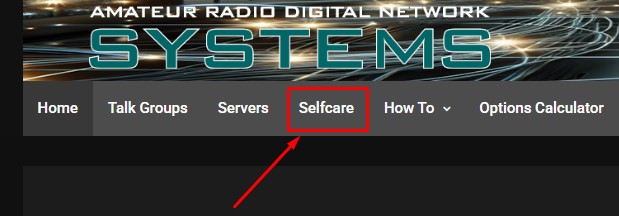
1 . Click on the “Selfcare” menu on the top navigation bar.
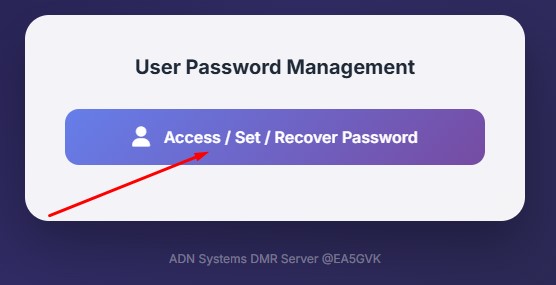
2 . Click on the button “Access / Set / Recover Password“
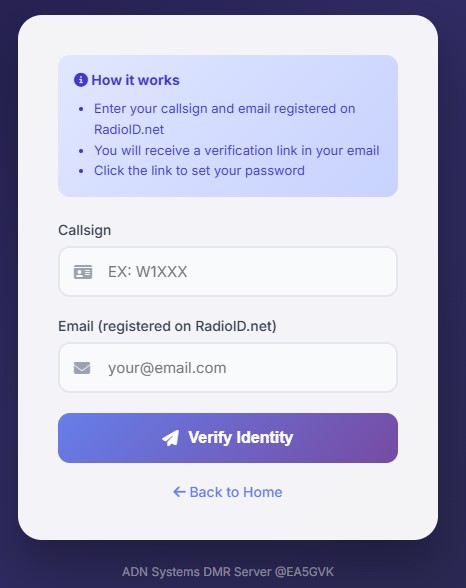
3 . Enter your callsign and email address registered on RadioID.net, and click the “Verify Identity button“. You will receive a link in your email address, which will allow you to access the selfcare panel.
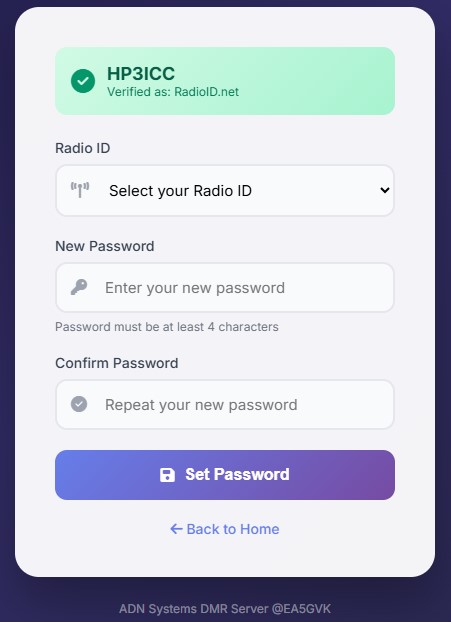
4. If you have more than one ID registered to your callsign, select the ID for which you want to customize the hotspot password.
- Enter your new hotspot password.
- Confirm your new hotspot password
- Click the “Set Password” button.
You will receive a confirmation email with the new password you must use to connect your hotspots.
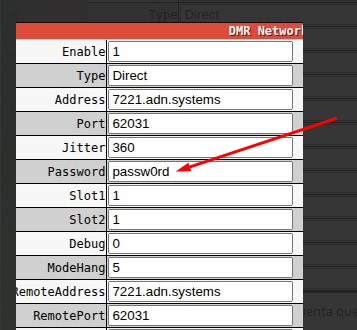
5. Configure your hotspot to use your new password
5A. Pi-Star
Connect to your Pi-Star Dashboard
Configuration
Expert
MMDVMHost
Scroll down to “DMR Network” that shows Address: xxxx.adn.systems
Type in your new password in the “Password” field
Click “Apply Changes”, wait some time, verify connection
Reboot hotspot if connection does not work
5B. WPSD
Connect to your WPSD Dashboard
Admin
Advanced
Quick Editors -> DMR -> DMR Gateway
Scroll down to “DMR Network” that shows Address: xxxx.adn.systems
Type in your new password in the “Password” field
Click “Apply Changes”, wait some time, verify connection
Reboot hotspot if connection does not work
___________________________________________________________________________________________________________
Your new secure password will be ready to connect successfully to the ADN Systems DMR network.